Idatalink
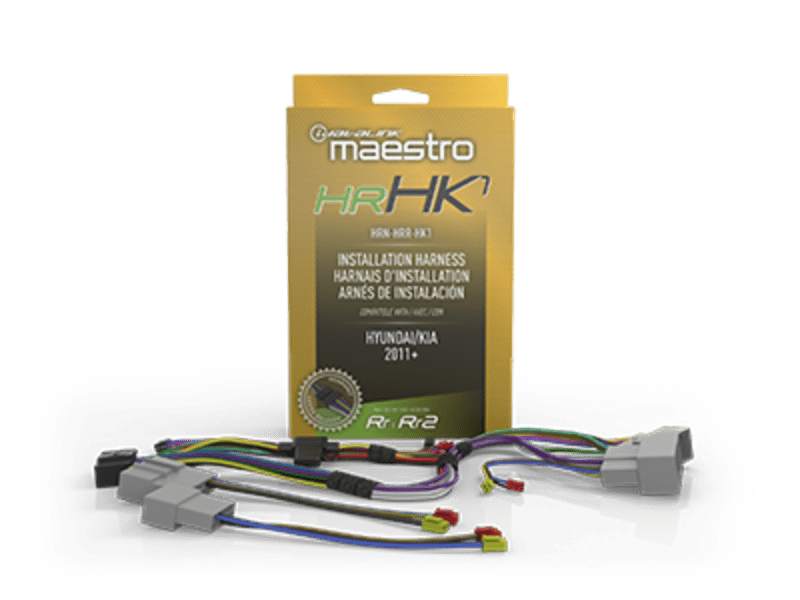
iDatalink Maestro HRN-HRR-HK1 Radio Replacement T-Harness for Select Non-Amplified Hyundai & Kia
iDatalink Maestro HRN-HRR-HK1 Radio Replacement T-Harness for Select Non-Amplified Hyundai & Kia
Couldn't load pickup availability
Buy with the right details confirmed
Confirm your exact year, model, factory equipment, and any required companion parts before ordering.
Check your vehicle in the MCOR Fit Guide- Authorized retailer New, authentic product from MCOR Automotive.
- Fast U.S. shipping Review shipping details
- Expert help since 2004 Ask MCOR before you order
- Clear return terms Review the return policy
The iDatalink Maestro HRN-HRR-HK1 Radio Replacement T-Harness for Select Non-Amplified Hyundai & Kia is designed for select Hyundai and Kia vehicles without a factory amplifier in current HK1 radio-replacement coverage. It gives you the connection needed for the supported installation without presenting the part as a complete system.
At a Glance
- Vehicle-specific radio-replacement T-harness for the exact applications listed below
- Designed for a separately sold Maestro RR or RR2 interface programmed for the vehicle
- Head-unit-ready connection supports compatible Maestro radio-specific adapters where listed
- Helps retain supported steering-wheel controls, factory amplification, cameras, vehicle settings, and data features when the application allows
- Factory radio, navigation, amplifier, screen, camera, trim, and other equipment must match the table
Exact Vehicle Compatibility
Find your vehicle and factory radio configuration below. Match the make, model, year, and equipment details in the same row. If your vehicle does not match a row, contact MCOR before ordering.
| Make | Model | Years | Factory Radio / Equipment Qualifier |
|---|---|---|---|
| Hyundai | Accent | 2012-2017 | All |
| Hyundai | Elantra | 2011-2018 |
2011-2016: All Radio Trims Without Amplifier (Amplified vehicle solution Requires MRR2) 2017-2018: Without CarPlay or Android Auto Without Amplifier (Amplified vehicle solution Requires MRR2) |
| Hyundai | Elantra GT | 2013-2017 | All Radio Trims / Without Amplifier |
| Hyundai | Genesis Coupe | 2013-2016 | All Radio Trims Without Amplifier (Amplified vehicle solution Requires MRR2) |
| Hyundai | Santa Fe | 2013-2018 |
2016-2018: Base Model Without Amplifier (Amplified vehicle solution Requires MRR2) 2013-2015: Without Amplifier (Amplified vehicle solution Requires MRR2) |
| Hyundai | Santa Fe Sport | 2013-2018 |
2013-2015: Without Amplifier (Amplified vehicle solution Requires MRR2) 2016: Without Apple Carplay / Android Auto / Without Amplifier 2017-2018: Without Apple Carplay / Android Auto Without Amplifier (Amplified vehicle solution Requires MRR2) |
| Hyundai | Sonata | 2011-2018 |
2011-2015: Without Amplifier (Amplified vehicle solution Requires MRR2) 2016-2018: Without Apple Carplay / Android Auto / Without Amplifier (Amplified or Carplay/Android Auto Trim Requires MRR2) |
| Hyundai | Tucson | 2010-2018 |
2015-2017: With Display Radio (Apple Carplay or Android Auto) / Without Amplifier 2015-2017: With Factory Navigation / Without Amplifier 2010-2016: Without Amplifier (Amplified vehicle solution Requires MRR2) 2017-2018: Without Apple Carplay / Android Auto Without Amplifier (Amplified vehicle solution Requires MRR2) |
| Kia | Forte | 2014-2018 |
2014-2016: / Without Amplifier 2017-2018: Without Apple Carplay / Android Auto / Without Amplifier |
| Kia | Forte 5 | 2014-2018 | All / Without Amplifier |
| Kia | Forte Koup | 2014-2017 | All / Without Amplifier |
| Kia | Optima | 2011-2018 |
2014-2015: Base With UVO Without Amplifier (Amplified vehicle solution Requires MRR2) 2014-2016: With Factory Navigation Without Amplifier (Amplified vehicle solution Requires MRR2) 2011-2016: Without Amplifier (Amplified vehicle solution Requires MRR2) 2017-2018: Without Apple Carplay / Android Auto / Without Amplifier |
| Kia | Rio | 2012-2017 | Base Model With Factory Navigation |
| Kia | Rio 5 | 2012-2017 | / Without Amplifier |
| Kia | Sedona | 2015-2016 | With Factory Navigation Without Amplifier (Amplified vehicle solution Requires MRR2) Without Factory Navigation Without Amplifier (Amplified vehicle solution Requires MRR2) |
| Kia | Sorento | 2012-2018 |
2016: / Without Amplifier 2012-2013: / Without Amplifier With UVO 2015-2017: With Factory Navigation / Without Amplifier 2014-2015: Without Amplifier (Amplified vehicle solution Requires MRR2) 2017-2018: Without Apple Carplay / Android Auto Without Amplifier (Amplified vehicle solution Requires MRR2) |
| Kia | Soul | 2012-2016 | Without Amplifier (Amplified vehicle solution Requires MRR2) |
| Kia | Sportage | 2011-2019 |
2011-2016: Without Amplifier (Amplified vehicle solution Requires MRR2) 2017-2019: Without Apple Carplay / Android Auto / Without Amplifier |
Compatibility & What You Need
Required: Maestro RR or Maestro RR2, programmed for the exact vehicle and aftermarket radio. Dash kit, antenna/USB/camera adapters, radio-specific head-unit adapter, and other application parts are sold separately unless expressly included.
Compatible & Related Products
- Maestro ADS-MRR radio replacement interface - sold separately; application-dependent
- Maestro ADS-MRR2 radio replacement interface - sold separately; application-dependent
- iDatalink Maestro ACC-USB-HK1 Factory USB & AUX Retention Adapter for Select Hyundai & Kia - sold separately; application-dependent
- Maestro ACC-HU-ALP1 Alpine head-unit adapter - sold separately; application-dependent
- Maestro ACC-HU-KEN1 Kenwood/JVC head-unit adapter - sold separately; application-dependent
- Maestro ACC-HU-KEN2 Kenwood/JVC head-unit adapter - sold separately; application-dependent
- Maestro ACC-HU-PIO1 Pioneer head-unit adapter - sold separately; application-dependent
- Maestro ACC-HU-SON1 Sony head-unit adapter - sold separately; application-dependent
Technical Specifications
| Specification | Details |
|---|---|
| Brand | iDatalink Maestro |
| Manufacturer part number | HRN-HRR-HK1 |
| Product type | Vehicle-specific radio replacement T-harness |
| System family | Maestro RR / RR2 radio replacement |
| Primary application | select Hyundai and Kia vehicles without a factory amplifier in current HK1 radio-replacement coverage |
What's Included
- One genuine iDatalink Maestro HRN-HRR-HK1 product package
- Manufacturer-supplied components shown or listed for this part number
Fitment disclaimer: Compatibility is not determined by year and model alone. Verify the exact vehicle, trim, factory radio, navigation, amplifier/audio package, screen, camera or entertainment equipment, aftermarket radio, required interface, firmware, and accessories before ordering. Contact MCOR Automotive through the chat button for application help.
Why Buy From MCOR Automotive
- Authorized iDatalink Maestro retailer with manufacturer-backed warranty support
- Vehicle-specific compatibility help before purchase
- Professional car-audio integration and installation support
Share